
Why VRAM matters for fine-tuning
When selecting the best GPUs for fine-tuning LLMs, VRAM is the primary bottleneck. Unlike standard inference, which can run on modest hardware, training a model requires storing optimizer states, gradients, and activations in memory. This demand scales linearly with model size, making VRAM capacity the deciding factor for what you can actually train on your own machine.
The gap between inference and training memory is significant. A 7B parameter model requires only about 4–6 GB of VRAM for inference, but full fine-tuning demands roughly 14 GB. This jump explains why consumer cards with 8 GB of memory often fail during training, even if they handle chat responses smoothly. For larger models, the requirements skyrocket, pushing you toward 24 GB cards like the RTX 3090 or 4090 as the minimum viable entry point.
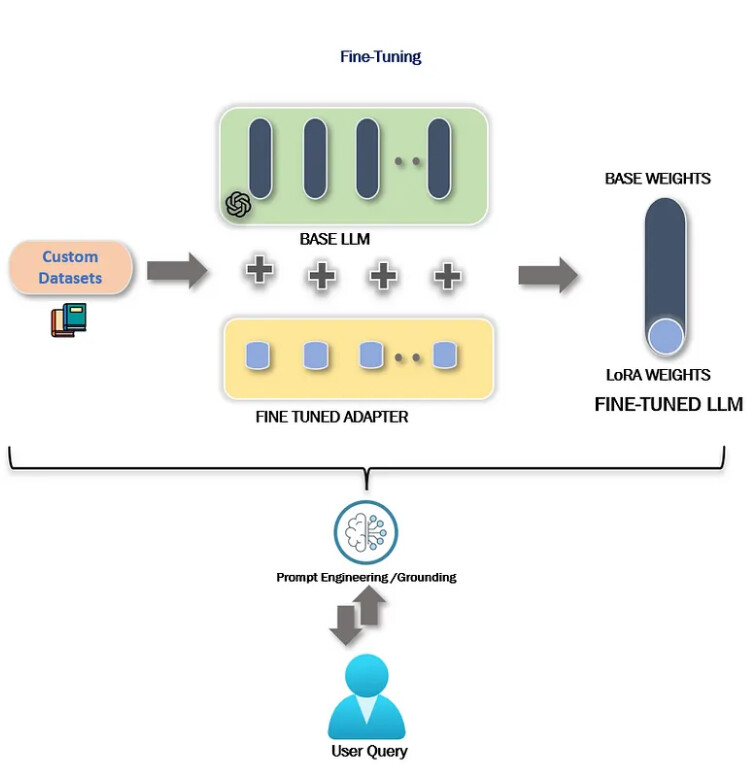
To mitigate these hardware costs, techniques like QLoRA allow you to fine-tune larger models on smaller GPUs by quantizing the base weights. However, even with optimization, you still need enough VRAM to hold the quantized model plus the active training buffers. Choosing a GPU with ample VRAM ensures you aren't limited to tiny datasets or small model sizes, giving you the flexibility to experiment with the latest open-source architectures.
Best consumer GPUs for fine-tuning
Local fine-tuning has shifted from a specialized research task to a standard engineering workflow. In 2026, the barrier to entry is defined by VRAM capacity and memory bandwidth. While cloud GPUs offer scale, consumer cards provide the best balance of cost and accessibility for developers running models like Llama 3, Qwen, or DeepSeek on-premise.
The selection criteria for this section prioritize raw VRAM, which dictates model size, and community support, which ensures available tooling for quantization and optimization. We focus on NVIDIA’s consumer line because CUDA remains the dominant framework for local AI development. AMD’s ROCm support is improving but remains less standardized for quick deployment.
Top Consumer GPU Picks
For most developers, the sweet spot lies between 16GB and 24GB of VRAM. This range allows for efficient 4-bit quantization of 7B to 13B parameter models, enabling fine-tuning on a single card without hitting memory walls. Higher-end cards are reserved for larger models or full-precision training, which requires significantly more resources.


As an Amazon Associate, we may earn from qualifying purchases.
The RTX 4090 remains the undisputed king of consumer fine-tuning. Its 24GB of VRAM allows you to load larger models or use larger batch sizes during training. While expensive, it offers the best performance-per-dollar for heavy lifting. If your budget is tighter, the 16GB cards (4080 Super and 4070 Ti Super) are viable for 7B and 8B models, provided you use quantization techniques like QLoRA to keep memory usage low.
LoRA vs QLoRA hardware needs
Choosing between standard LoRA and quantized QLoRA fundamentally changes which GPU you actually need. The difference isn't just about software settings; it dictates whether you can run a 70-billion parameter model on a single consumer card or if you need to cluster multiple high-end units. For most builders in 2026, QLoRA is the practical bridge that makes large-scale fine-tuning accessible without enterprise budgets.
Standard LoRA requires the full precision weights of the model to be loaded into VRAM. A 7B model needs roughly 14GB just for weights, leaving little room for batch size or context length. A 70B model demands 140GB of VRAM, forcing you to use expensive multi-GPU setups like dual RTX 4090s or A6000s. QLoRA compresses these weights to 4-bit precision, dropping the requirement for a 70B model to roughly 20GB. This allows a single RTX 3090 or 4090 to handle models that previously required data center hardware.
The trade-off is minor. QLoRA introduces a slight computational overhead during training, often increasing iteration time by 10-15%, but the memory savings are exponential. You gain the ability to use larger batch sizes and longer context windows on the same hardware. If your goal is cost-effective fine-tuning on consumer GPUs, QLoRA is the default choice.
| Method | VRAM (7B Model) | VRAM (70B Model) | Typical GPU |
|---|---|---|---|
| Standard LoRA | 14 GB+ | 140 GB+ | Dual 24GB GPUs |
| QLoRA | 6 GB+ | 20 GB+ | Single 24GB GPU |


As an Amazon Associate, we may earn from qualifying purchases.
For those starting out, the RTX 3090 remains the value king because its 24GB VRAM allows QLoRA fine-tuning of 13B and even 70B models at a fraction of the cost of new hardware. The RTX 4090 offers faster training times due to improved tensor cores, making it better for iterative experiments. If you are strictly doing inference after fine-tuning, the VRAM requirements drop significantly, but for training, 24GB is the new minimum standard for serious work.
Setting up your fine-tuning stack
Before you start training, you need a stable software foundation. The 2026 fine-tuning stack relies on a specific combination of Python, CUDA, and Hugging Face libraries. Getting these versions right prevents the "it works on my machine" errors that waste hours of GPU time.
Start with Python 3.11 or newer. This version offers the best performance and compatibility with modern ML libraries. Pair it with PyTorch 2.5+ and CUDA 12.x. These are the non-negotiables for accessing your GPU's full potential.
1. Install the Hugging Face Ecosystem
The Hugging Face library is the backbone of modern fine-tuning. It provides the transformers model loader, datasets for data handling, peft for parameter-efficient tuning, and trl for reinforcement learning from human feedback (RLHF). Install them together to ensure version compatibility.
2. Configure Your Environment
Use a virtual environment manager like conda or venv. This isolates your fine-tuning dependencies from your system Python. A clean environment prevents library conflicts, especially when you later try to run inference or deploy your model.
3. Prepare Your Dataset
Fine-tuning requires structured data. Use the datasets library to load and preprocess your JSONL or CSV files. Ensure your data is cleaned and formatted correctly before it hits the GPU. Bad data in, bad model out.
4. Select Your Base Model
Choose a base model that fits your GPU's VRAM. For 2026, models like Llama 3.1 or Mistral variants are popular starting points. Download the model weights using transformers before you begin training to avoid interruptions.
5. Run a Dry Run
Before committing to a full training run, execute a dry run with a small subset of your data. This checks your code, your data format, and your GPU memory usage. It’s a quick way to catch errors before they cost you hours of compute time.
Ensure your system drivers and Python installation are up to date. PyTorch 2.5+ requires CUDA 12.x for optimal GPU acceleration. Verify the installation with torch.cuda.is_available().
Install the core stack: transformers, datasets, peft, and trl. These libraries handle model loading, data processing, and efficient training loops. Use pip install or conda install for a quick setup.
Clean your data and convert it to a standard format like JSONL. Use the datasets library to load and tokenize your data. Ensure your prompts and responses are correctly aligned for the training task.
Test your setup with 10-100 examples. This verifies your code, data format, and GPU memory usage. Catching errors early saves hours of wasted training time and potential hardware stress.


As an Amazon Associate, we may earn from qualifying purchases.
Common Questions About GPU Fine-Tuning
Which GPU is best for fine-tuning LLMs? For most developers, the NVIDIA GeForce RTX 4090 with 24GB of VRAM is the most cost-effective choice for fine-tuning 7B and 13B models. It handles full fine-tuning via QLoRA and offers a strong balance of performance and price compared to professional data center cards.
How much does it cost to fine-tune a 7B model? Cloud costs for fine-tuning a 7B parameter model typically run under $5 for a single job. This includes GPU rental and data processing. However, building your own hardware requires a significant upfront investment in high-end consumer GPUs or enterprise-grade accelerators.
Can I fine-tune LLMs on a CPU? Technically yes, but it is not practical. Fine-tuning large language models on CPUs is exponentially slower than on GPUs. You can run inference on a CPU, but the training process would take days or weeks instead of hours, making it inefficient for iterative development.
No comments yet. Be the first to share your thoughts!