
Decide if fine-tuning beats RAG
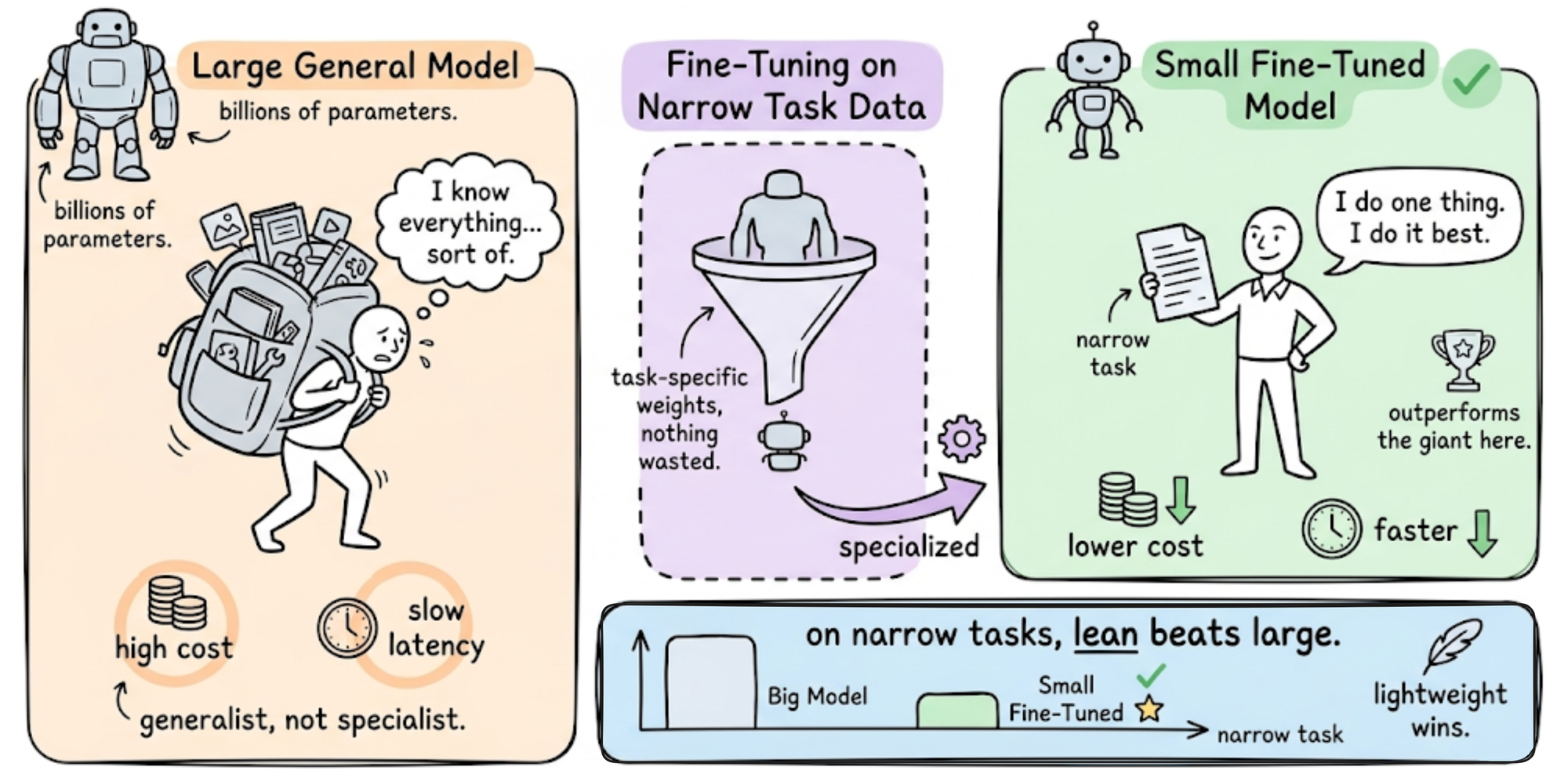
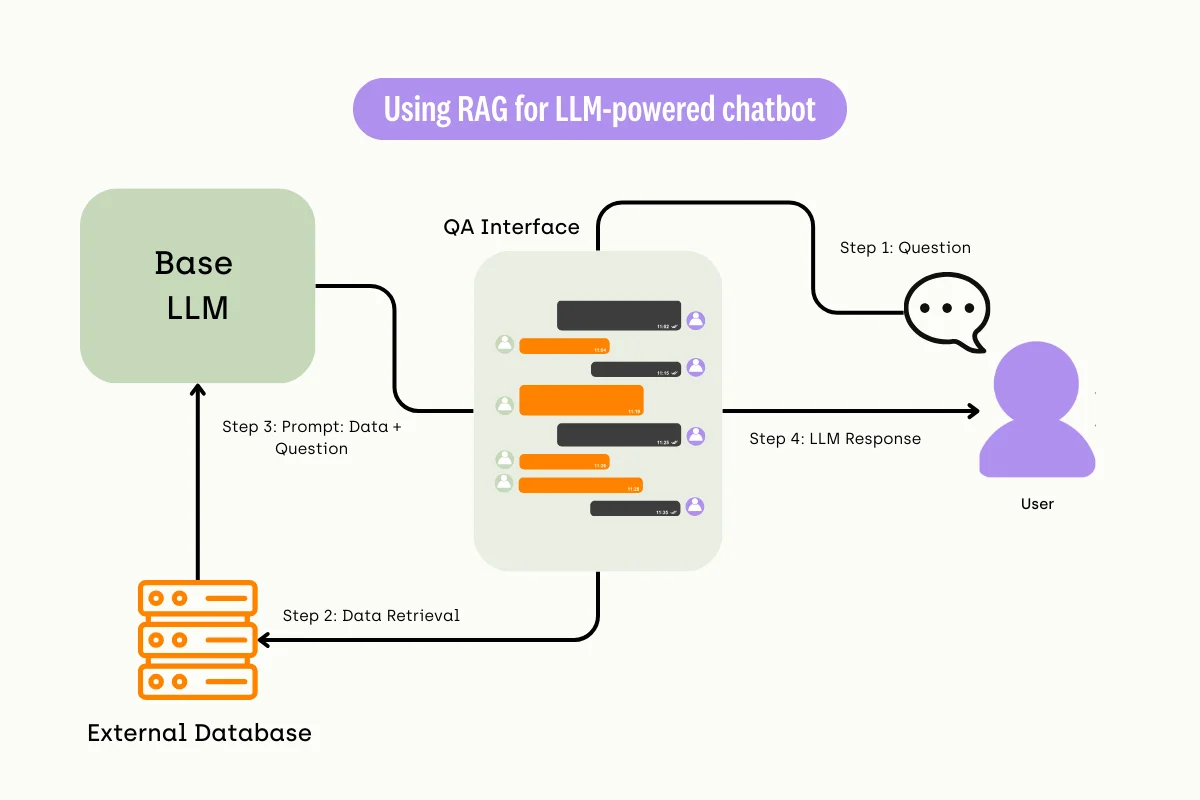
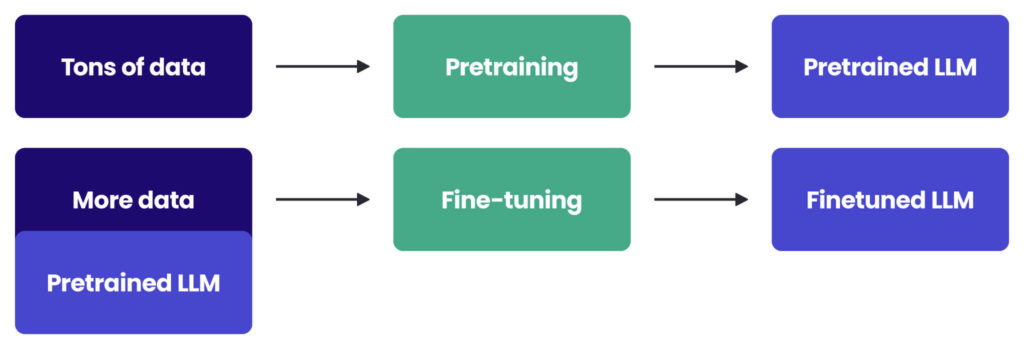
Before allocating compute resources, determine whether fine-tuning large language models is the right path or if retrieval-augmented generation (RAG) suffices. Fine-tuning adapts the model weights to learn new behaviors, formatting, or domain-specific reasoning that static prompts cannot capture. RAG, by contrast, injects external context at inference time without altering the underlying model.
The decision rests on your data’s stability and your latency requirements. Fine-tuning is ideal for consistent tone, specialized jargon, or strict output schemas. RAG is superior for factual accuracy, frequently changing data, or when you need to cite sources. If your knowledge base changes daily, fine-tuning becomes a maintenance burden as you must retrain the model to reflect updates.
Evaluate your use case against these criteria:
- Consistency: Does the model need to follow a rigid format every time? Fine-tuning enforces this. RAG relies on the prompt to enforce structure.
- Freshness: Is the information time-sensitive? RAG pulls the latest data. Fine-tuned models have a knowledge cutoff.
- Compute Budget: Can you afford GPU hours for training? RAG requires only inference hardware.
If you choose fine-tuning, the 2026 stack centers on Python 3.11+, PyTorch 2.5+, CUDA 12.x, and the Hugging Face ecosystem (transformers, datasets, peft, trl). For most enterprises, starting with RAG and prompt engineering is the lower-risk path. Move to fine-tuning only when RAG fails to meet accuracy or consistency targets.
Prepare your training dataset
Fine-tuning a large language model is only as good as the data you feed it. In 2026, the gap between a model that actually helps and one that hallucinates is defined by dataset quality, not size. You are not training the model to learn new facts; you are teaching it a specific style, format, or reasoning pattern. This process is called Supervised Fine-Tuning (SFT), and it requires a clean, structured dataset of input-output pairs.
Structure for SFT
Supervised Fine-Tuning works by showing the model examples of correct behavior. Your dataset must be formatted as a series of instructions and their corresponding ideal responses. The industry standard format is JSONL (JSON Lines), where each line is a valid JSON object containing the conversation history or prompt-response pairs.
For example, if you are fine-tuning a model for customer support, one line might look like this:
{
  "messages": [
    {"role": "user", "content": "How do I reset my password?"},
    {"role": "assistant", "content": "To reset your password, click the 'Forgot Password' link..."}
  ]
}
This structure tells the model exactly what to expect as input and what to generate as output. Avoid raw text files; the model needs explicit separation between the user’s query and the desired answer.
Quality Over Quantity
A common mistake is collecting thousands of low-quality examples. A dataset of 500-1,000 highly curated, error-free examples often outperforms a dataset of 50,000 noisy ones. Each example must be reviewed for accuracy, tone consistency, and clarity. If your data contains contradictions, biases, or factual errors, the model will learn those flaws.
Focus on diversity within your specific use case. Ensure your examples cover the edge cases and variations of your topic. If you are fine-tuning for legal advice, include examples with complex, multi-part questions, not just simple yes/no queries. The goal is to create a representative sample of the tasks your model will face in production.
Select base model and PEFT method
Choosing the right foundation model and tuning method determines whether your project stays within budget. The 2026 fine-tuning stack centers on Python 3.11+, PyTorch 2.5+, and the Hugging Face ecosystem (transformers, datasets, peft, trl) [[src-serp-3]]. You do not need a $10,000 GPU cluster to get results.
Start by picking a base model that matches your domain. Open-source models like Llama 3, Mistral, and Qwen offer strong performance with permissive licenses. Then, select Parameter-Efficient Fine-Tuning (PEFT) methods like LoRA or QLoRA. These techniques freeze most of the model weights and only train small adapter layers, reducing VRAM requirements by up to 75%.
Compare base models
Different models excel in different areas. Llama 3 is a strong generalist. Mistral is efficient for code. Qwen handles multilingual tasks well. Use this table to compare parameter sizes, licenses, and typical fine-tuning costs.
| Model | Params | License | Est. Fine-Tune Cost |
|---|---|---|---|
| Llama 3.1 | 8B | Llama 3.1 | <$5 |
| Mistral 7B | 7B | Apache 2.0 | <$5 |
| Qwen 2.5 | 7B | Apache 2.0 | <$5 |
| Llama 3.1 | 70B | Llama 3.1 | <$50 |
| Mistral Large | 123B | Mistral | <$100 |
Choose PEFT over full fine-tuning
Full fine-tuning requires loading the entire model into VRAM, which is expensive and slow. PEFT methods like LoRA (Low-Rank Adaptation) inject trainable rank decomposition matrices into each layer of the Transformer architecture. This allows you to fine-tune a 7B model for under $5 using consumer-grade GPUs [[src-serp-7]].
QLoRA takes this further by quantizing the base model to 4-bit precision. This reduces memory usage even more, allowing you to fine-tune larger models on smaller hardware. For most ROI-driven projects, QLoRA is the standard choice in 2026. It offers near-full fine-tuning quality at a fraction of the cost.
Match model size to task
Do not over-provision. A 7B parameter model is sufficient for many classification and summarization tasks. Reserve 70B+ models for complex reasoning or domain-specific generation where smaller models fail. Start small, measure performance, and scale only if necessary. This approach minimizes compute waste and accelerates iteration.
Run the fine-tuning workflow
The 2026 fine-tuning stack centers on Python 3.11+, PyTorch 2.5+, CUDA 12.x, and the Hugging Face ecosystem (transformers, datasets, peft, trl) [[src-serp-3]]. This combination offers the best balance of speed and memory efficiency for running local LLMs.
The following steps guide you through installing the environment and executing a parameter-efficient fine-tune using Unsloth or Hugging Face TRL. This approach targets maximum ROI by minimizing GPU costs while maintaining high model quality.
Set up a clean virtual environment with Python 3.11 or 3.12. Install PyTorch 2.5+ with CUDA 12.x support, then add the core Hugging Face libraries: transformers, datasets, peft, and trl. For faster training, install unsloth to leverage optimized kernel implementations that reduce memory usage by up to 60%.
Structure your dataset as a JSONL or Parquet file with instruction, input, and output columns. Use the Hugging Face datasets library to load and tokenize the data. Apply a consistent chat template (e.g., Llama 3 or Qwen) to ensure the model understands the conversation format during training.
Initialize the SFTTrainer from trl or Unsloth’s fine-tuning API. Set the learning rate to 2e-4, use a batch size of 4, and enable QLoRA with 4-bit quantization. This setup allows you to fine-tune a 7B model for under $5 in cloud GPU costs [[src-serp-7]]. Limit epochs to 3-5 to prevent overfitting on small datasets.
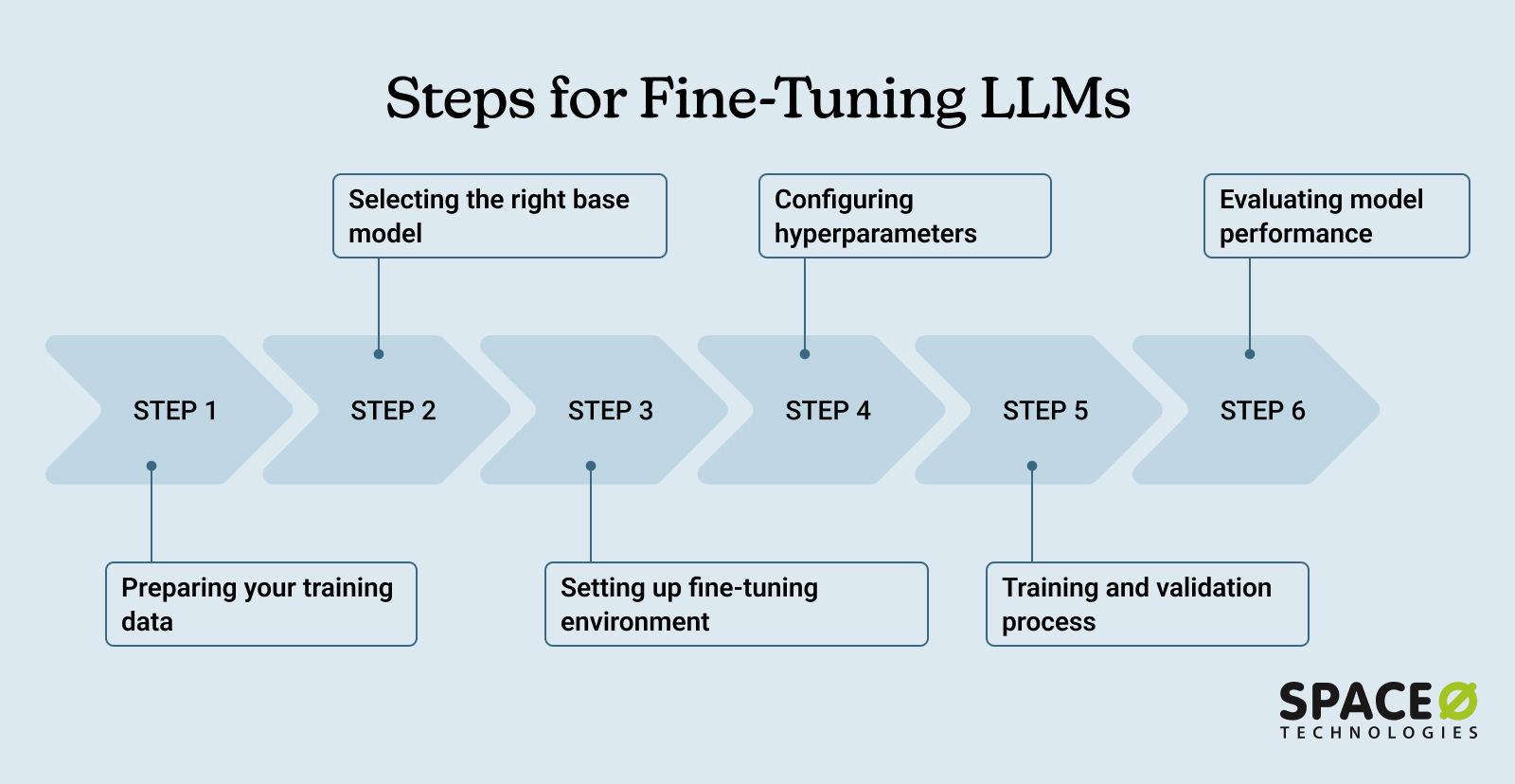
Launch the training job. Monitor the loss curve to ensure it decreases steadily. If using Unsloth, the training will be significantly faster than standard TRL due to fused kernel optimizations. Save the adapter weights to a local directory for later merging.
Merge the LoRA adapters back into the base model using peft. Run a series of evaluation prompts to verify the model follows instructions correctly. Compare the output against a baseline to ensure the fine-tuning improved performance on your specific task without degrading general capabilities.
Evaluate model performance
Validation is the bridge between a theoretical win and actual ROI. Before deploying, you must prove the model solves the specific task better than the baseline. This section covers the two pillars of evaluation: automated metrics for speed and human evaluation for nuance.
Automated metrics
Start with quantitative checks. Use exact match or BLEU scores for rigid tasks like code generation or data extraction. For open-ended responses, rely on ROUGE or BERTScore to measure semantic similarity. These metrics provide a quick health check but cannot judge reasoning quality or factual accuracy.
Human evaluation
Automated scores often miss hallucinations or tone mismatches. Conduct a blind comparison where annotators rank responses from your fine-tuned model against the base model. Focus on criteria that matter to your business: accuracy, helpfulness, and adherence to brand voice. If the cost of a bad answer is high, require consensus from multiple raters.
Pre-deployment checklist
-
Verify loss convergence on the validation set.
-
Check hallucination rates against a held-out truth set.
-
Test against baseline prompts to ensure improvement.
-
Confirm latency meets service-level agreements.
Deploy and monitor for drift
Deployment is where your fine-tuned model meets the real world. Without a structured rollout, even the best-trained model can degrade quickly as user behavior shifts or data distributions change. The goal is to maintain ROI by catching performance drops before they impact your users.
1. Set up a staging environment
Before going live, test your model in a staging environment that mirrors production. Use the same hardware configuration and data pipelines to identify latency issues or memory bottlenecks. This step prevents costly outages and ensures the model behaves as expected under load.
2. Implement continuous monitoring
Monitor key metrics like response latency, token usage, and output quality. Set up alerts for anomalies, such as a sudden drop in accuracy or a spike in error rates. Tools like Prometheus and Grafana are popular for tracking these metrics in real time. Regular reviews help you adjust hyperparameters or retrain the model as needed.
3. Plan for model updates
LLMs evolve, and so should your fine-tuned versions. Schedule regular updates to incorporate new data or fix emerging biases. This keeps your model relevant and accurate over time.


As an Amazon Associate, we may earn from qualifying purchases.
Common questions about 2026 fine-tuning
Fine-tuning an LLM in 2026 is no longer reserved for teams with massive compute budgets. The stack has shifted toward efficient parameter methods that drastically lower the barrier to entry.
How much does fine-tuning cost in 2026?
Running a full fine-tune on a 7B parameter model now costs under $5 when using cloud spot instances and parameter-efficient techniques like LoRA. This pricing applies to models like Llama, Qwen, and DeepSeek, making it viable for small teams and individual developers to iterate quickly without significant capital expenditure.
What hardware do I need to fine-tune locally?
The 2026 fine-tuning stack centers on Python 3.11+, PyTorch 2.5+, CUDA 12.x, and the Hugging Face ecosystem (transformers, datasets, peft, trl). For local execution, you generally need a GPU with at least 16GB of VRAM for 7B models using quantization. Larger models require proportionally more memory, but efficient adapters keep the footprint manageable.
Does fine-tuning improve ROI more than RAG?
Fine-tuning injects specific knowledge directly into the model weights, which reduces latency and context window usage compared to Retrieval-Augmented Generation (RAG). While RAG is excellent for dynamic data, fine-tuning is more cost-effective for static, domain-specific tasks where consistency and speed are critical for return on investment.
No comments yet. Be the first to share your thoughts!